
Players can start your app as guests, but the ones who register are the ones you can bring back. This guide is our suggested approach for turning guests into registered players: when to ask, how to ask, and what to say.
Why Registration Matters
Registration is the step that turns a one-time visit into a relationship. It does three things for you:
- Unlocks notifications: Guests can’t receive notifications, so a registered player is the only kind you can bring back from their messaging inbox.
- Protects progress: Guest sessions can be lost when someone closes the app or browser. When a guest registers, their saved progress transfers to their account.
- Earns you revenue share: When a player registers in your app, or through your tracking link, your team is credited as the acquirer. That team earns 20% of everything the player spends anywhere on Jest for the next 12 months.
Four Examples: Our Top Pick First
These are ordered by our recommendation, from the approach we suggest most to the one to treat as a fallback. The mockups all use one sample game; the patterns and numbers come from real games on Jest, anonymized.
The order is Jest’s recommendation, not a guarantee. Results vary by game.
1. Best: A Custom Sign-Up Flow
Your game’s first level, designed as a sign-up flow: the player plays, names their hero, signs up, and keeps playing. It all happens inside the game.
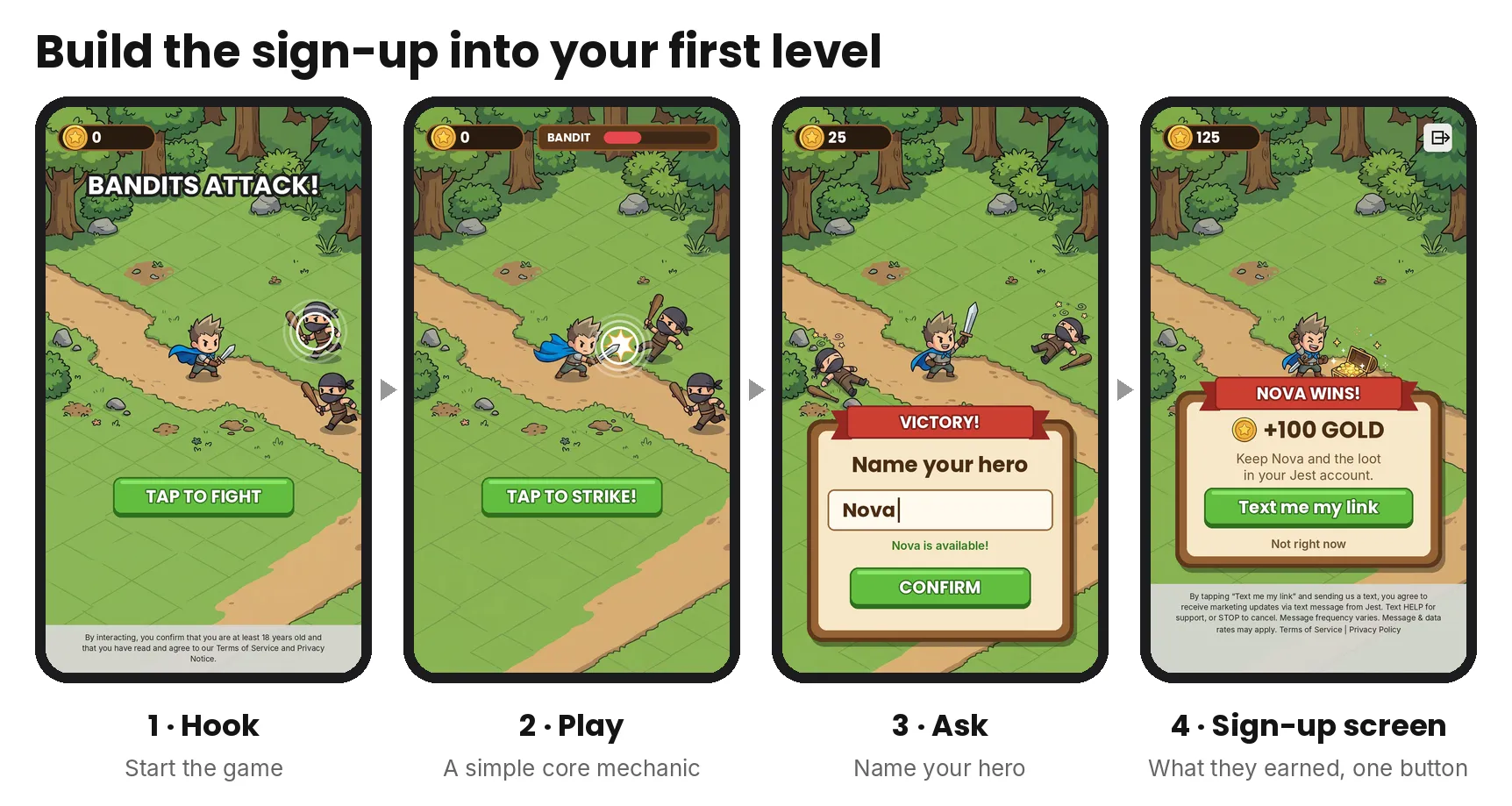
Sign-up flow in the first level: start, fight, name your hero, sign-up screen
Every screen builds toward the ask: a quick fight, then the player names their hero. Naming makes the hero personal and gives the player a sense of ownership, so by the sign-up screen they’re saving something that’s theirs. See Going Further below for how to build one.
In the data: in Jest’s own sign-up tests (short flows that end in sign-up), removing the name step roughly doubled the cost per sign-up.
2. Themed Prompt: Save What They Just Earned
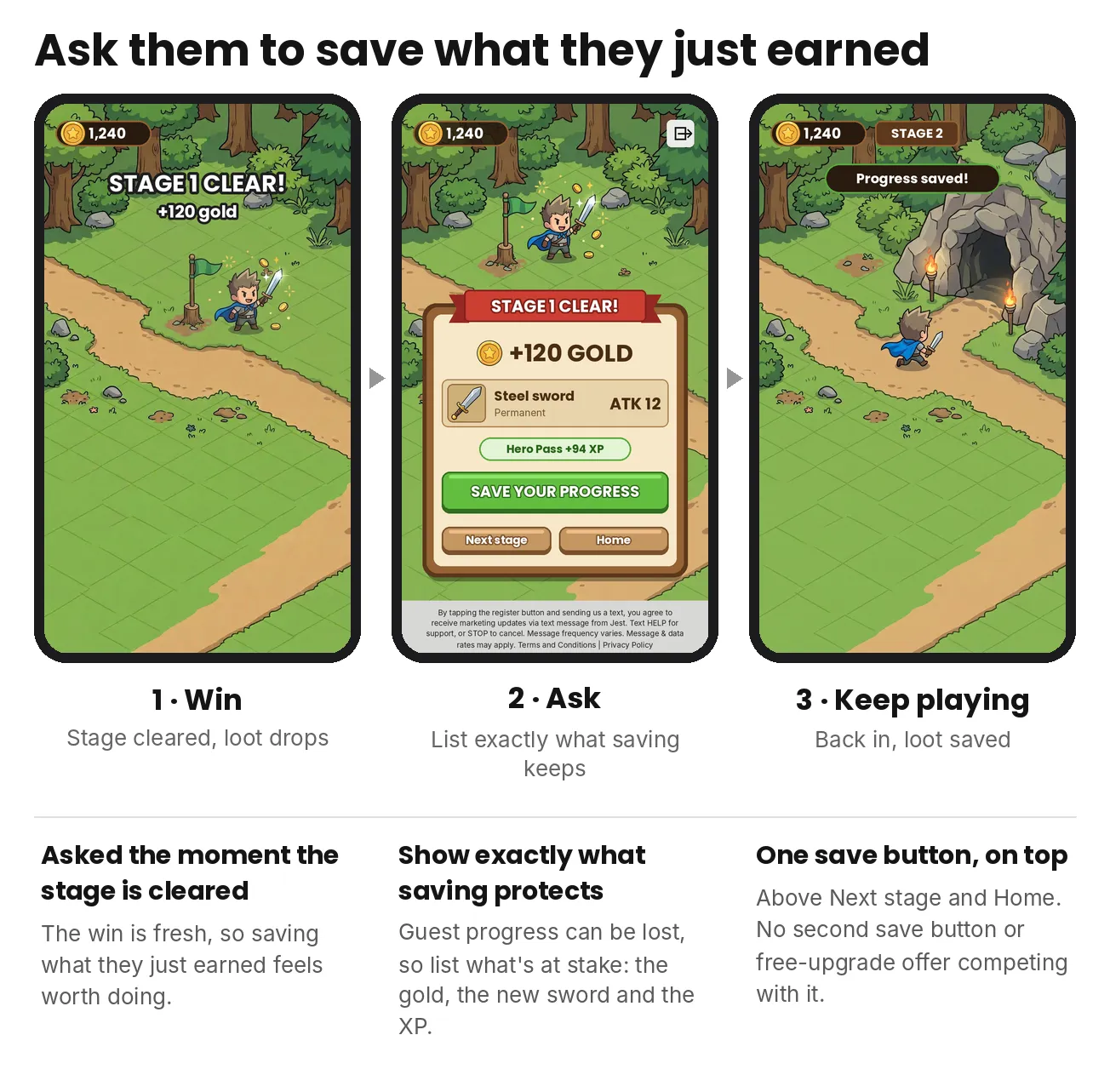
Save what they just earned: win, ask, keep playing
The ask points at specific loot. The panel shows up the moment the stage is cleared and lists exactly what saving protects: the gold, the new sword and the XP.
In the data: in Game A, 68.8% of players shown this panel tapped it.
3. Themed Prompt: Save the Adventure
Also in the game’s own art, but this one doesn’t point at any one item. Right after the player clears a zone, it asks them to save their whole adventure: their hero and their progress.
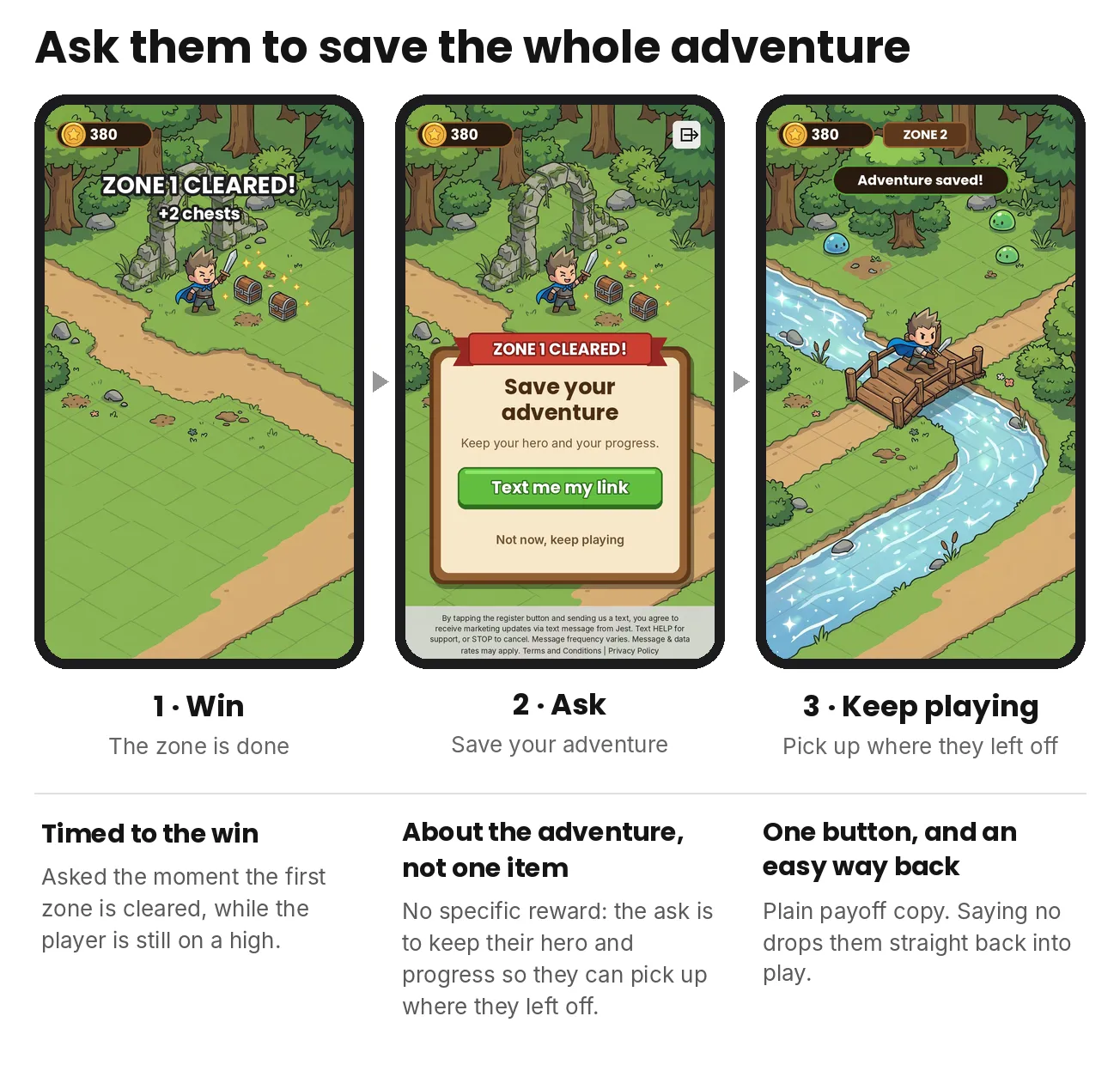
Save the adventure: win, ask, keep playing
The card is about keeping the adventure going so they can pick up where they left off, not about a particular reward. One clear button, and an easy way back to play.
In the data: in Game B, 56% of guests who opened this ask registered. Registered ad players came back the next day at 45%, against 4% for guests.
4. Standard: The Automatic Jest Popup
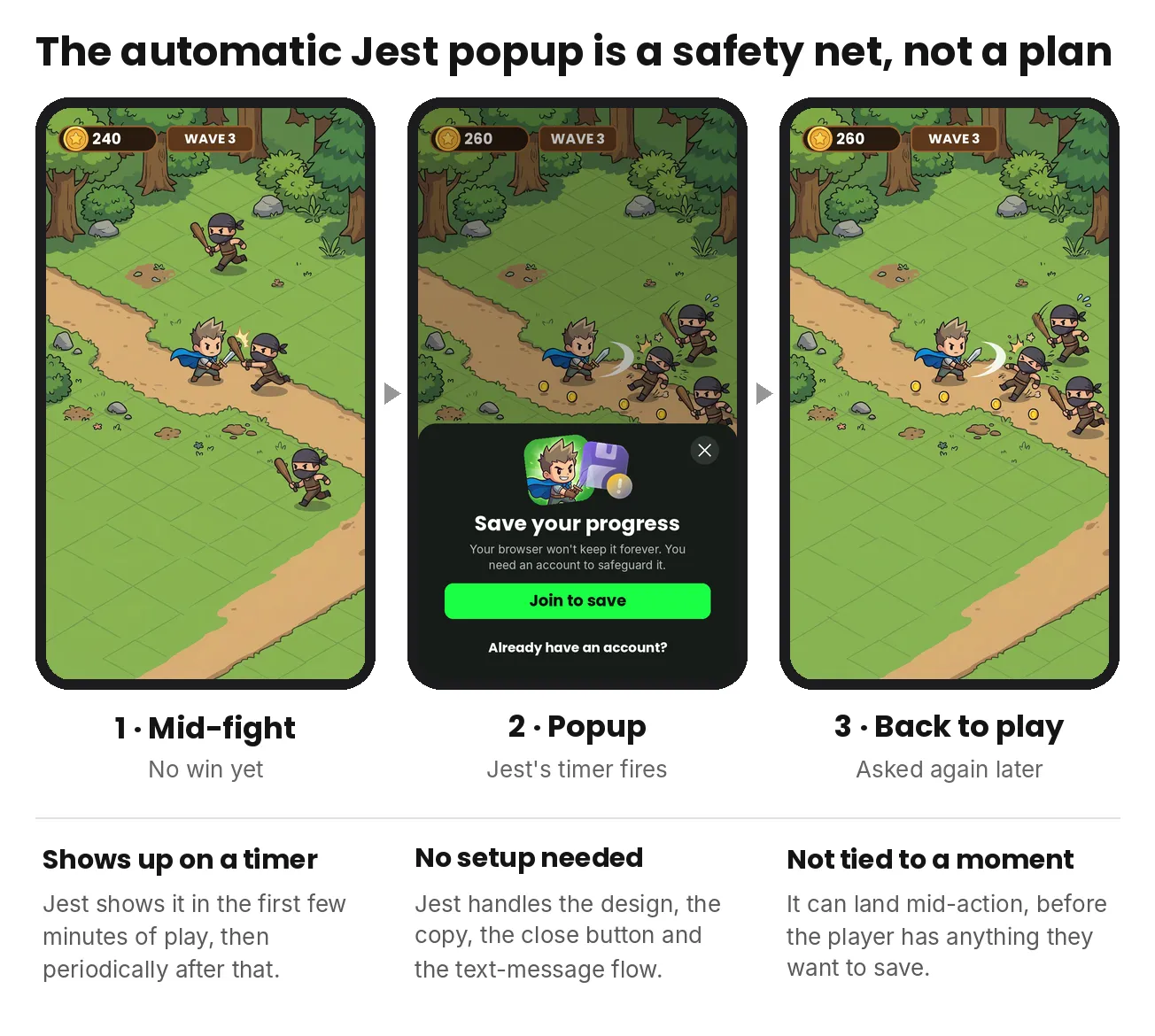
The automatic Jest popup: mid-fight, popup, back to play
It takes no work and still catches some sign-ups, but it shows up on a timer, not at a moment the player cares about. We suggest treating it as a safety net while you build one of the options above.
This is the same popup you can trigger yourself with login(). Called at a good moment, it works well; the fallback is leaving it to Jest’s timer.
If you prompt players yourself, turn this popup off in your SDK init options so no one sees two prompts.
Going Further: Build Your First Level As A Sign-Up Flow
Your first level can double as your sign-up flow: a short stretch of real play that builds to something worth saving, asks the player to sign up, then keeps them playing. Think of it as the first five minutes of your game, ending in sign-up.
A strong sign-up flow is a tight 3–4 step stretch of play with one clear goal. These are the base ingredients, not a fixed recipe:
- Hook: Open on instant stakes, like “Bandits attack! Tap to fight.” Use glowing objects, motion or arrows to show what to tap.
- Play: A simplified version of your core mechanic. Every tap, drag or swipe should make sense without instructions, with clear feedback and visible progress.
- Ask: Turn play into intent with a personal promise: name your hero, claim your score, reserve your reward, remind me about tomorrow’s puzzle. If you build your own name input, leave room for feedback like “Name taken” or “Too short.”
- Sign-up screen: The final screen before the messaging app opens. Keep the thing they just earned on screen, restate what’s at stake, and give one clear button. “Text me my link” was our strongest button copy. Use the registration overlay so Jest’s legal text and close button are handled for you.
When to Ask
Ask early, and ask right after the player feels something. We suggest asking within the first five minutes of play, right after a win. If your first big win takes longer than that, make it easier rather than asking before it. Registration should feel like a way to keep what they just got, not a toll booth.
Good moments to prompt:
- The first “aha!” right after the player experiences your core hook or first win.
- A hard-won victory such as finishing a tough level.
- A reward drop when they unlock a rare item or new feature.
- A hot streak the moment they’d hate to lose their progress.
- A feature that needs notifications like a daily reward, a timer, or tomorrow’s puzzle.
Frame the ask around what the player gets: save my pet, keep my score, claim my reward, remind me tomorrow. Asking someone to “sign up for Jest” gives them nothing to want.
For the rules on who and when to prompt, see the Launch checklist in the Jest docs.
For all the ways guests can be asked to register, see Registration and login paths in the User acquisition guide.
Our suggestion: own the moment. Jest’s guidance is that the most effective prompts land early and at a peak moment in play.
How to Ask
For setup steps and code, see Platform login in the Jest docs.
Writing the Text Message
To write your own pre-filled text message, see Custom registration message in the Jest docs.
What We’ve Seen Work
These are directional learnings from our own onboarding tests:
- Talk about the thing, not the platform: Messages about claiming a character or keeping a name beat messages that lead with registering for Jest. “Join Jest” is weaker than “Save your squad.”
- Short and simple wins: A plain instruction like “Send this text to claim…” performed well.
- Examples to adapt:
I'm claiming my reward chest! {{registrationCode}} is my key.Save my high score of 4,210 please. Key: {{registrationCode}}Send me tomorrow's puzzle! My key is {{registrationCode}}.
- Examples to adapt:
- A little urgency helps: Mentioning that the code is only valid for a few minutes showed promise.
- Avoid 2FA-style phrasing: like “Your code is…”, which messaging providers can block as spam.
Avoid
- Asking before any value: A prompt on the first screen gives the player nothing to protect.
- Breaking the message: A missing code, a message over 140 characters, or special characters that split it into two texts.
- Losing tutorial progress: Save it, so a player who leaves mid-tutorial picks up where they left off. In one game, about 60% of players who came back mid-tutorial never continued.
- Not tracking the ask: Log your own event when your prompt shows, and pass an
entryPayloadso you can see which prompt converted. Without it, you can’t tell where players drop. - No reason for guests to come back: Guests can’t get texts, so the game has to bring them back itself. Show something waiting for them, like a daily reward or idle progress, before they leave.