
August was about keeping users you’ve already earned and making the work around your app less manual. Among the highlights: an MCP server for your coding assistant, retention discounts for subscribers who are about to cancel, lifecycle hooks for hide, show, and exit, and more.
Connect your AI coding assistant to Jest
Checking retention, updating a product, uploading a build, looking up an SDK field name: each one used to mean leaving your code for the Developer Console.
The console now has a built-in MCP server. Point Claude Code, Cursor, or any other MCP client at it and it can read your analytics, manage products and subscription plans, upload builds and images, and access our docs, all from your editor or terminal.
claude mcp add --transport http jest https://jest.com/mcpYour assistant already knows how to write your app. Now it can see what’s happening around it: how users are engaging, what’s driving revenue, and what it takes to ship the next version.
Sign-in uses your normal Jest account, so there are no API keys to create, store, or rotate. Access is controlled from the MCP page under Tools. One setting covers every connected assistant, and starts read-only until you raise it. Your existing team roles still apply underneath: an assistant can only see and change what your account can.
The MCP server is in preview, so the tool list will keep moving while we work on it. → Connect an AI assistant, and we wrote a blog post with more use cases to try!
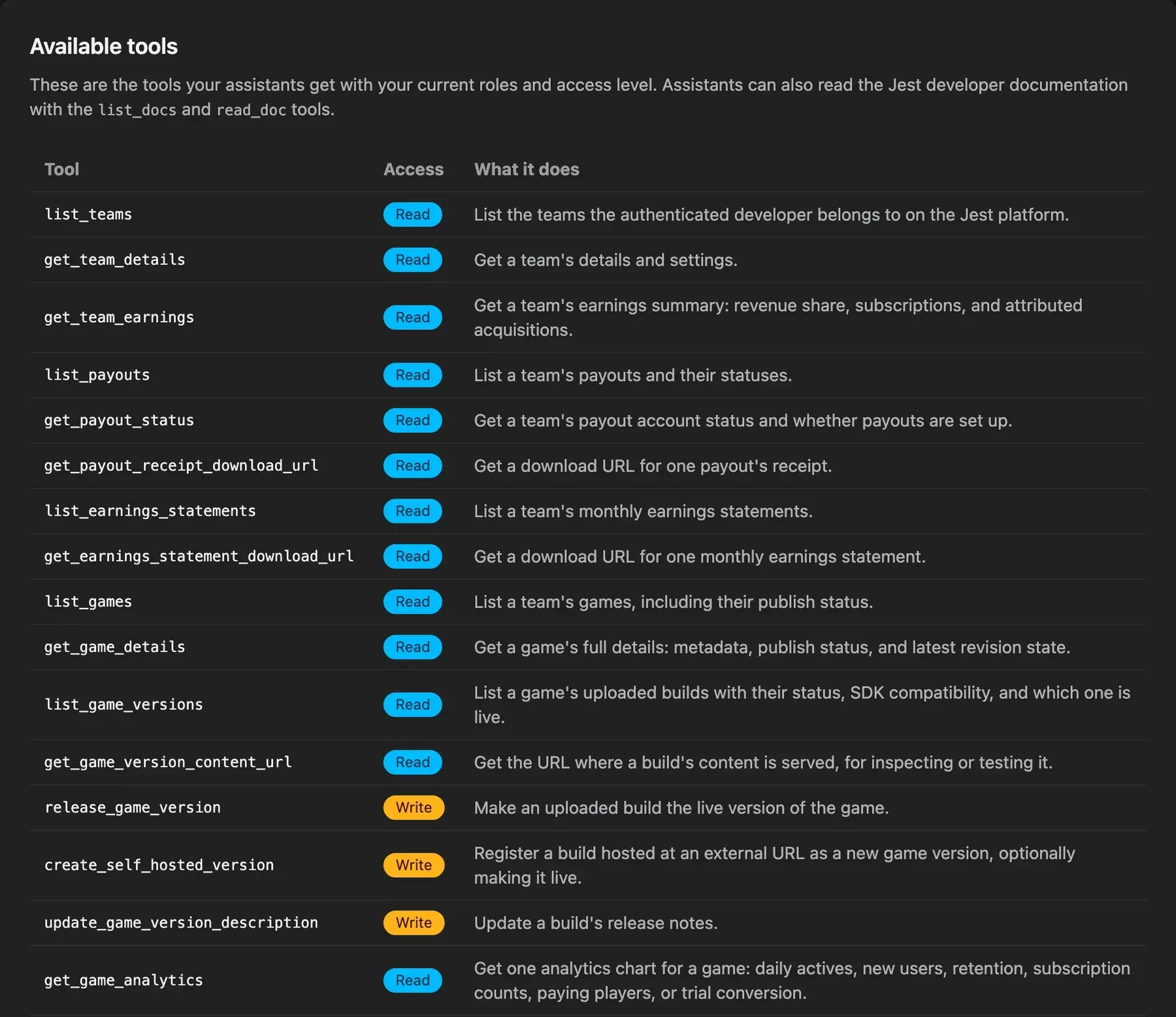
The Available tools table on the MCP page, with each tool marked Read or Write.
React to hide, show, and exit
JestSDK.lifecycle covers the moments when the platform, not your app, is in control. onHide and onShow fire when your app becomes hidden or visible again: when a user switches tabs, takes a call, or locks their screen. Pause your main loop, physics, and audio there, so users don’t come back to a soundtrack that never stopped or a timer that ran while they were away.
onExitRequested fires when a user begins a platform exit flow, from the footer’s exit control or a Back gesture Jest can intercept. It runs at the start of that flow, while your app is still alive, which is what makes it useful: by the time beforeunload or pagehide fire, the document is going away and JestSDK.data.set may never reach the Jest page. If you save at checkpoints, flush the rest here:
JestSDK.lifecycle.onExitRequested(() => {
  JestSDK.data.set("checkpoint", currentCheckpoint);
});
The user can still choose to stay, so save without tearing down your app; the hook can fire again later in the session. Neither visibility hook fires for the initial state, so await JestSDK.init() is your startup boundary, and every registration returns an unsubscribe function. Unity exposes OnHide, OnShow and OnExitRequested. → HTML5 · Unity
Offer a discount instead of losing a subscriber
Subscriptions can now carry a retention discount: a reduced price for a set number of months that your app can offer a subscriber who is about to cancel.
Nothing is automatic. You set the discounted price and its duration (1 to 12 months, monthly subscriptions only) in the Subscriptions tab of the Developer Console, and your app decides when to pitch it. → Console setup
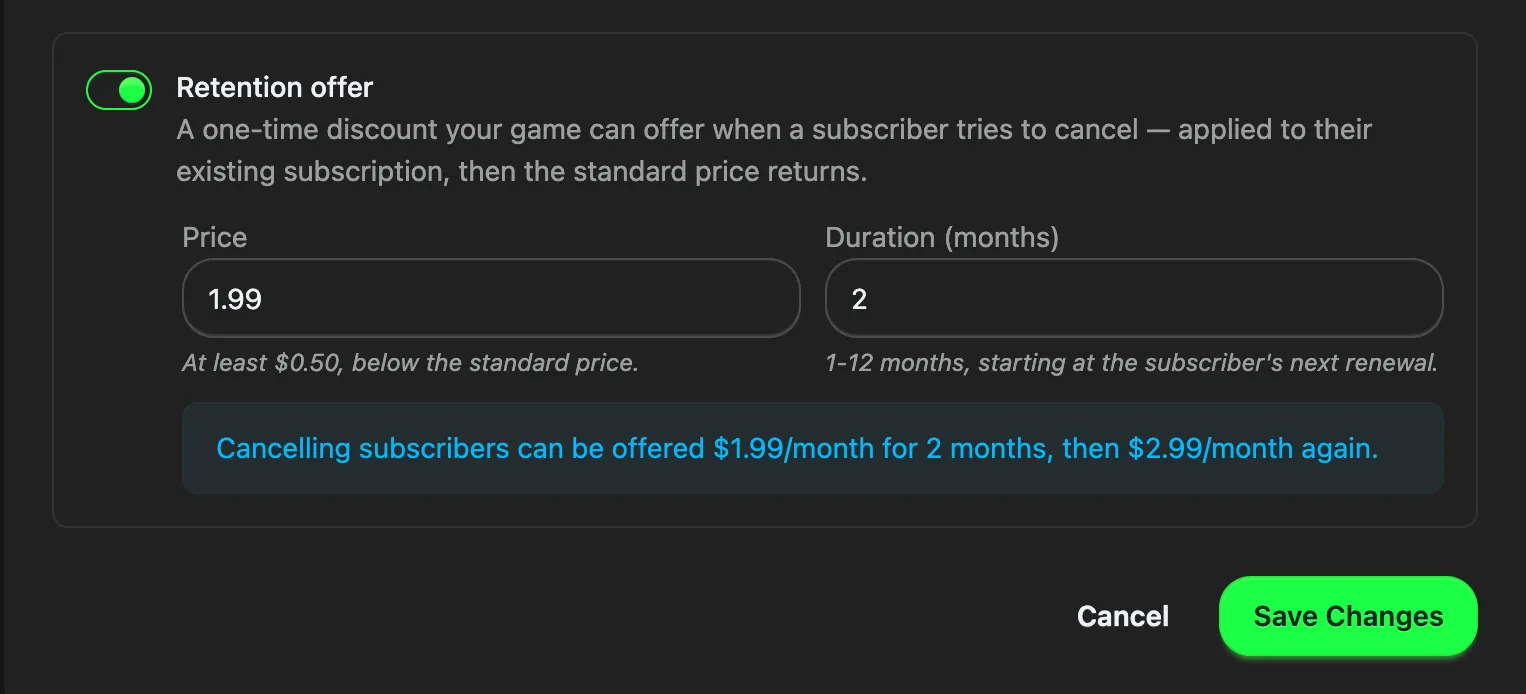
Configuring a retention offer in the Developer Console, with a preview of what a cancelling subscriber will be offered.
While a subscriber is eligible, SubscriptionData includes a nullable retentionOffer with its price and durationPeriods. Read it in your own cancel flow, and if they accept your pitch, call JestSDK.payments.claimRetentionOffer({ subscriptionSku }). The discount applies to their existing subscription instantly, with no checkout and no second product to configure, and the standard price returns on its own after durationPeriods renewals.
Each user can claim a given subscription’s retention discount once, and not while a free trial or an introductory offer window is still running.
Unity has the same capability, as ClaimRetentionOffer/RetentionOfferData. → HTML5 · Unity

Example of an in-game popup a subscription-based app could use to surface a retention offer during cancellation.
More to see in console analytics
Your app’s Analytics tab in the Developer Console now covers six core metrics: daily active users, new users, retention, subscription counts, paying users, and trial conversion. Each one downloads as CSV, so you can pull a series into a spreadsheet instead of reading it off a graph. All dates are reported in Pacific Time.
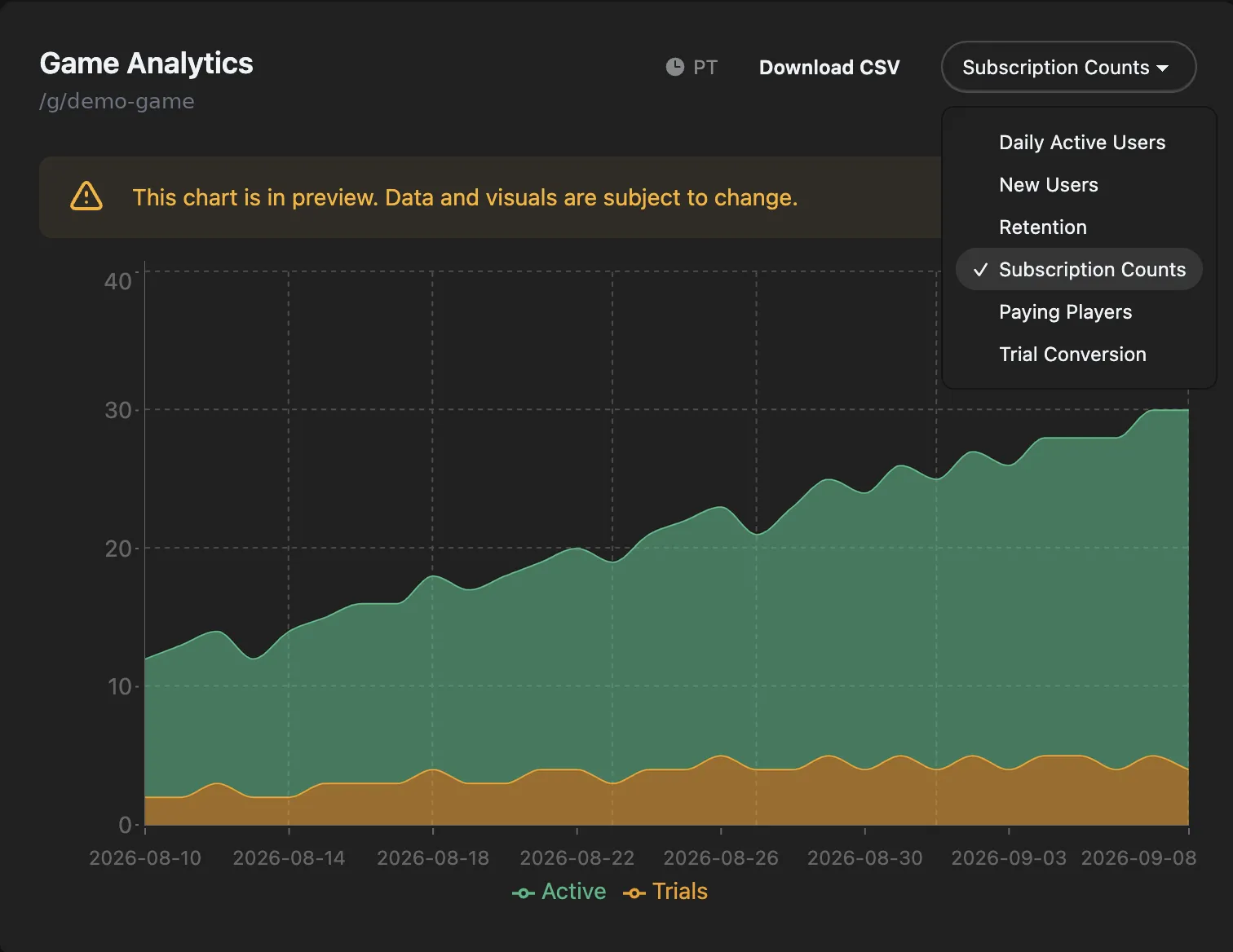
Picking a chart in the Analytics tab. Each one downloads as CSV.
The Financials tab swapped its wall of stat cards for a shorter set plus the same charts, and team earnings now break down by app, so a studio running several titles can see which one produced what.
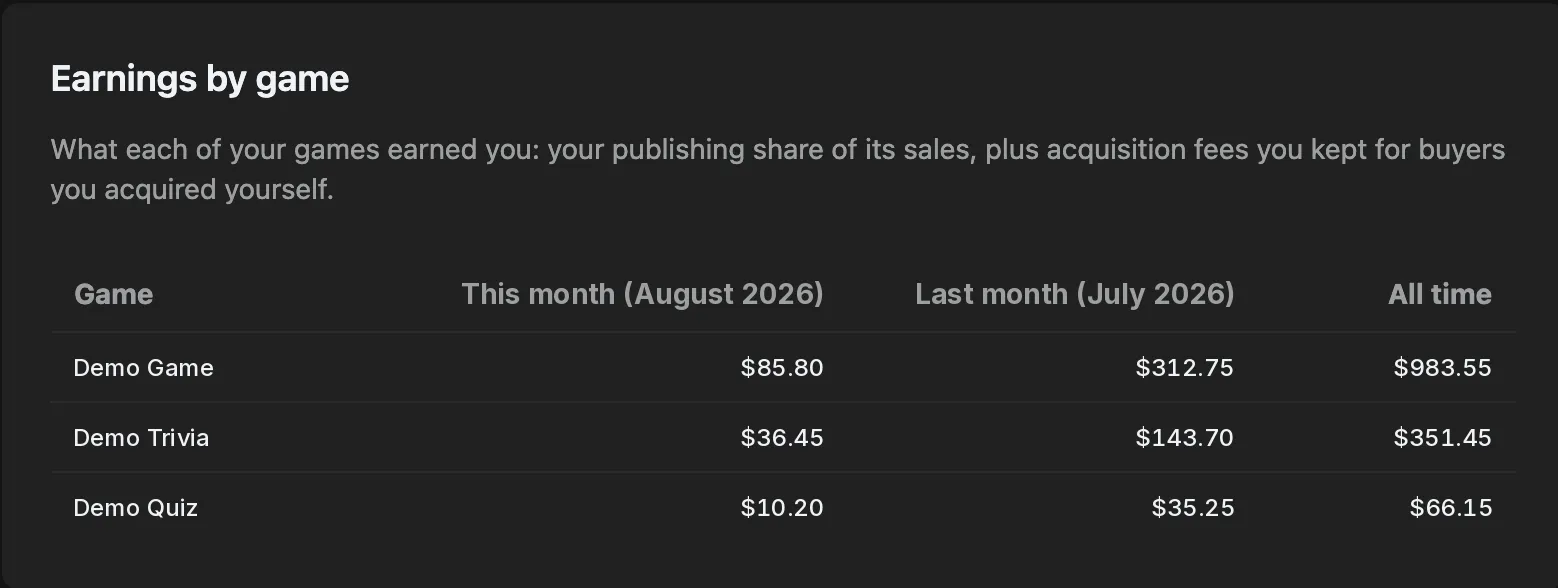
Team earnings broken down by app, across this month, last month, and all time.
Other updates worth knowing
- Sandbox purchases identify themselves:
PurchaseDataandSubscriptionDatanow carrysandbox?: true, present only when no money changed hands, whether that’s a sandbox user’s purchase or anything driven from the console simulator. It travels inside the signed JWS your backend verifies, sopurchase.sandbox === trueis enough to keep test traffic out of anything that counts real money. → Recognize sandbox purchases - SDK types are on npm: The runtime still loads from our CDN, but its types are now a real package, so you can stop hand-rolling an ambient declaration for
window.JestSDK. Install@jest-com/typesas a dev dependency, then name it in thetypesarray intsconfig.jsonor reference it from your own.d.tsfile, since TypeScript only auto-loads types fromnode_modules/@types/*. → TypeScript types estimatedRevenuereports real numbers again: It had been returning0in purchase and subscription data since its deprecation. It’s now back to reporting an estimate of your share.- The Library tab is now Home: The redesigned Library is now simply Home, and the footer tab is labeled Home everywhere. Exiting an app now returns users to Home rather than Explore, so they land back on the surface that lists the apps they already play. Home also now features a Recommended for you carousel of apps a user hasn’t played yet, giving your app another place to be discovered.
- Users can search Explore: Explore has a search field, giving your app another way to be found by name rather than only through the feed.
- The Simulator checks more of the launch checklist:
markGameLoaded()is now a must-have readiness signal, and the notification rules expect a D1 to D7 sequence, meaning at least one notification per day for the next seven days, with each one naming your app. Both are easier to fix in the Simulator than in review. → Simulator - Jest VIP is live: A platform-wide membership that gives users 10% back in Jest Wallet Rewards on eligible purchases. Rewards are funded by Jest and can be spent across the catalog, so VIP members may have more to spend in your app. Members also get a crown in chat and on their profile, unless they choose to hide it.
Full details for every change are in the changelog. New to Jest? Start with the developer docs.