
May was mostly about monetization. Subscriptions went into beta and financial reporting and payouts got a major upgrade, making it easier to see what you’ve earned.
The other big change was the Simulator. It went from a preview window to a real testing and review hub: launch any build, test real products and assets, record a self-review, and submit it for moderation, all in one place.
Better testing with the Simulator
Submitting for review now routes through the Simulator: Review submissions go through a dedicated Simulator page, where you record a self-review playthrough and attach notes. We watch that recording alongside the build so we can see the core loop working in the order you intended rather than having to go looking for it.
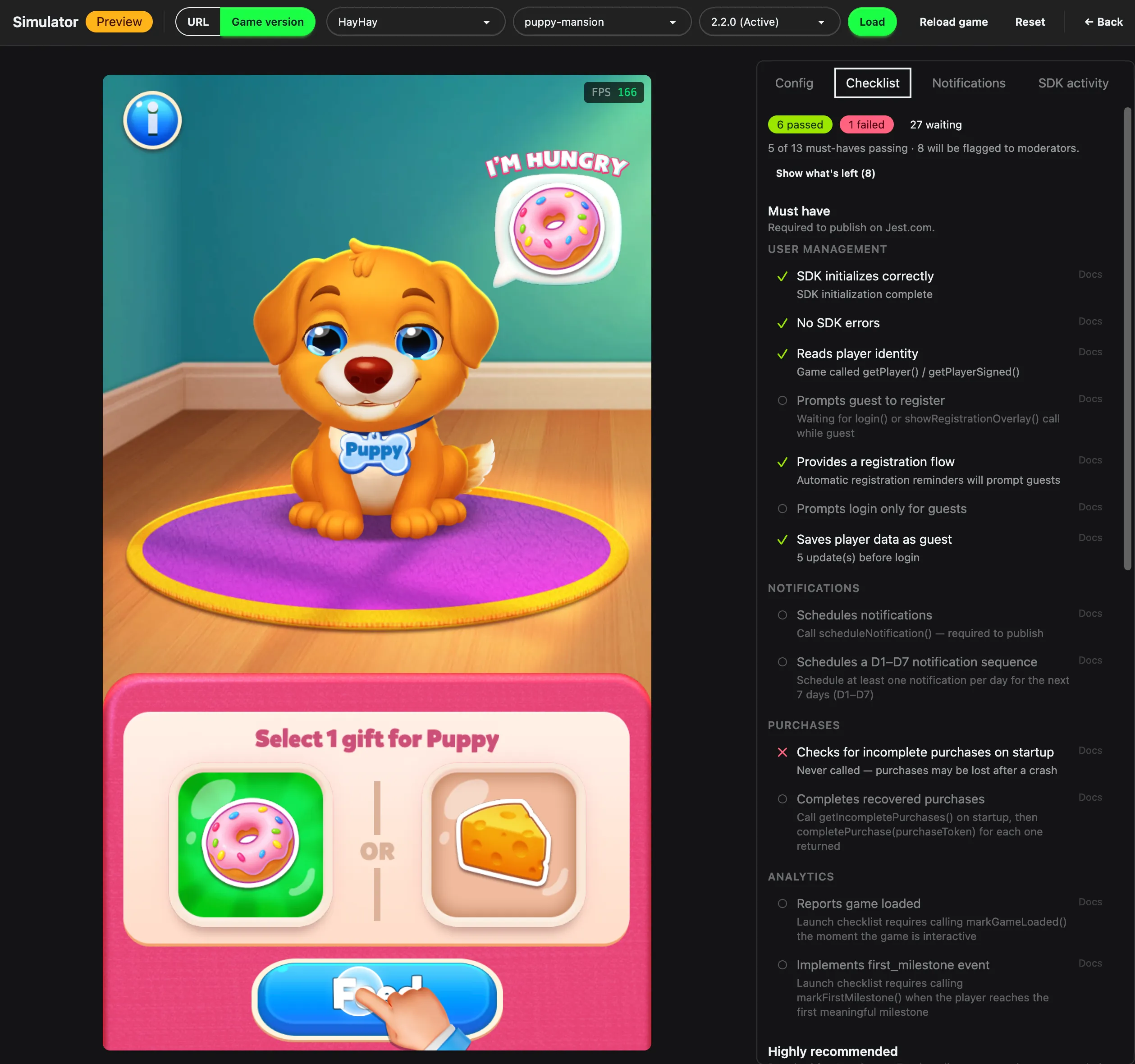
The Simulator scoring a build against the launch checklist, including what will be flagged to reviewers.
Run any build straight from the Versions tab: Every version now carries an action that opens it in the Simulator, so you no longer need to select a build by hand.
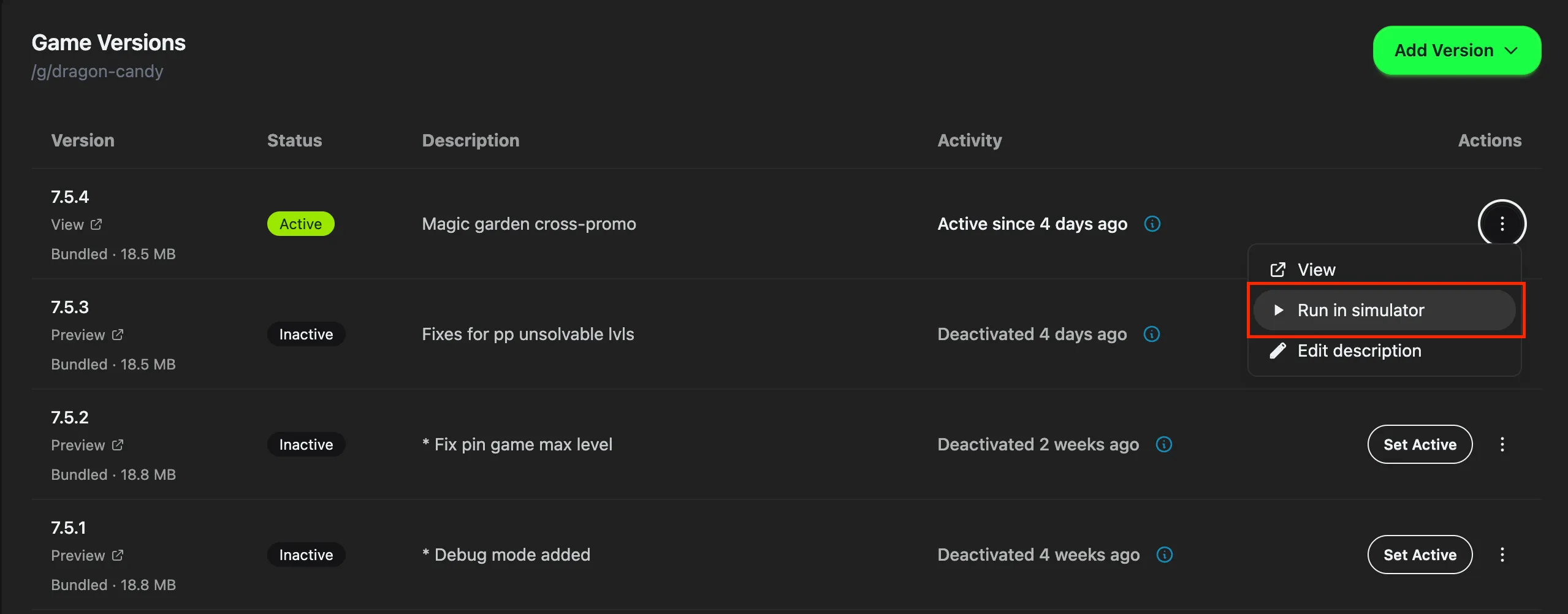
Run in simulator, in the row menu next to any version.
Real products and assets are pre-loaded: For apps that already exist, the Simulator imports your live product catalog and asset library automatically. Setting up mock purchase flows by hand used to be a chore, which meant payment paths got tested less thoroughly than they deserved. Testing a purchase now takes about as long as making one.
To learn more, see the Simulator docs.
Subscriptions in beta
Curious to explore subscriptions in your app? A recurring billing option is in beta across both SDKs:
HTML5: JestSDK.payments.getSubscriptions() and JestSDK.payments.beginSubscription() bring monthly recurring billing to HTML5. Entitlements report as "active" or "inactive" and include a subscriptionSigned payload for server-side verification. → HTML5 subscriptions · Console setup
Unity: The same capability in the engine wrapper: GetSubscriptions(), BeginSubscription() and CancelSubscription(). → Unity
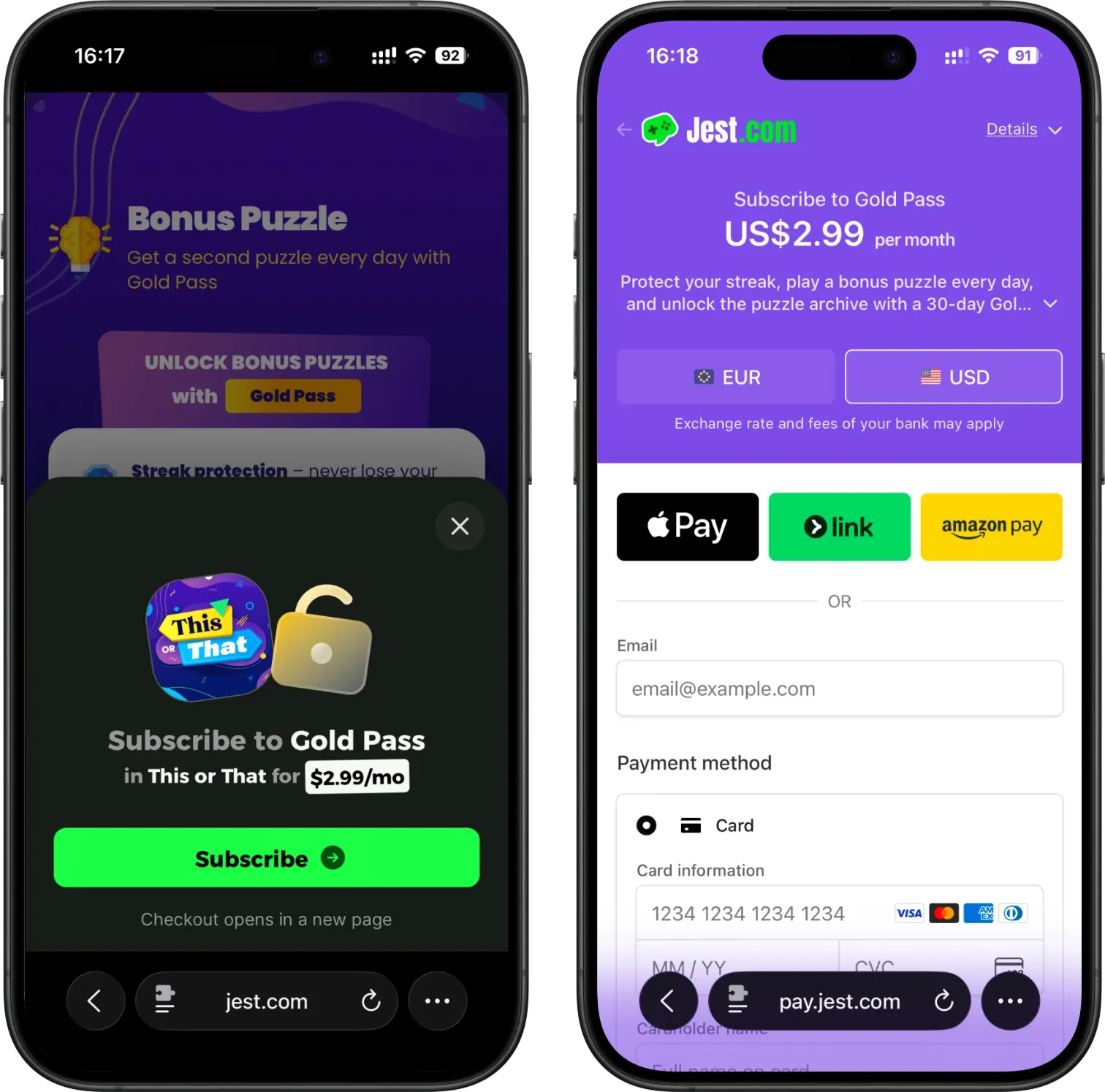
Subscription checkout example for This or That.
Typed error codes on purchases and subscriptions: beginPurchase(), beginSubscription() and cancelSubscription() now return { result: "error", error: "..." } with codes including already_subscribed, invalid_product and not_active, instead of quietly falling back to a cancel. A user who changed their mind and a user who hit a real failure used to look identical to your code, so you can now retry, explain or log them differently.
Improved financial reporting
Payouts: The payouts module shipped, with Stripe payouts alongside manual ones, a receipt for each, and earnings statements in the console. Access opens up to everyone holding a team role in early June.
Revenue share is calculated on net revenue: The split is applied after payment processing fees rather than on the gross amount, and it reconciles against the real Stripe fee once a charge settles instead of staying on an estimate.
Financials show real currency and per-transaction splits: Amounts render in currency, and each transaction exposes the split that produced it.
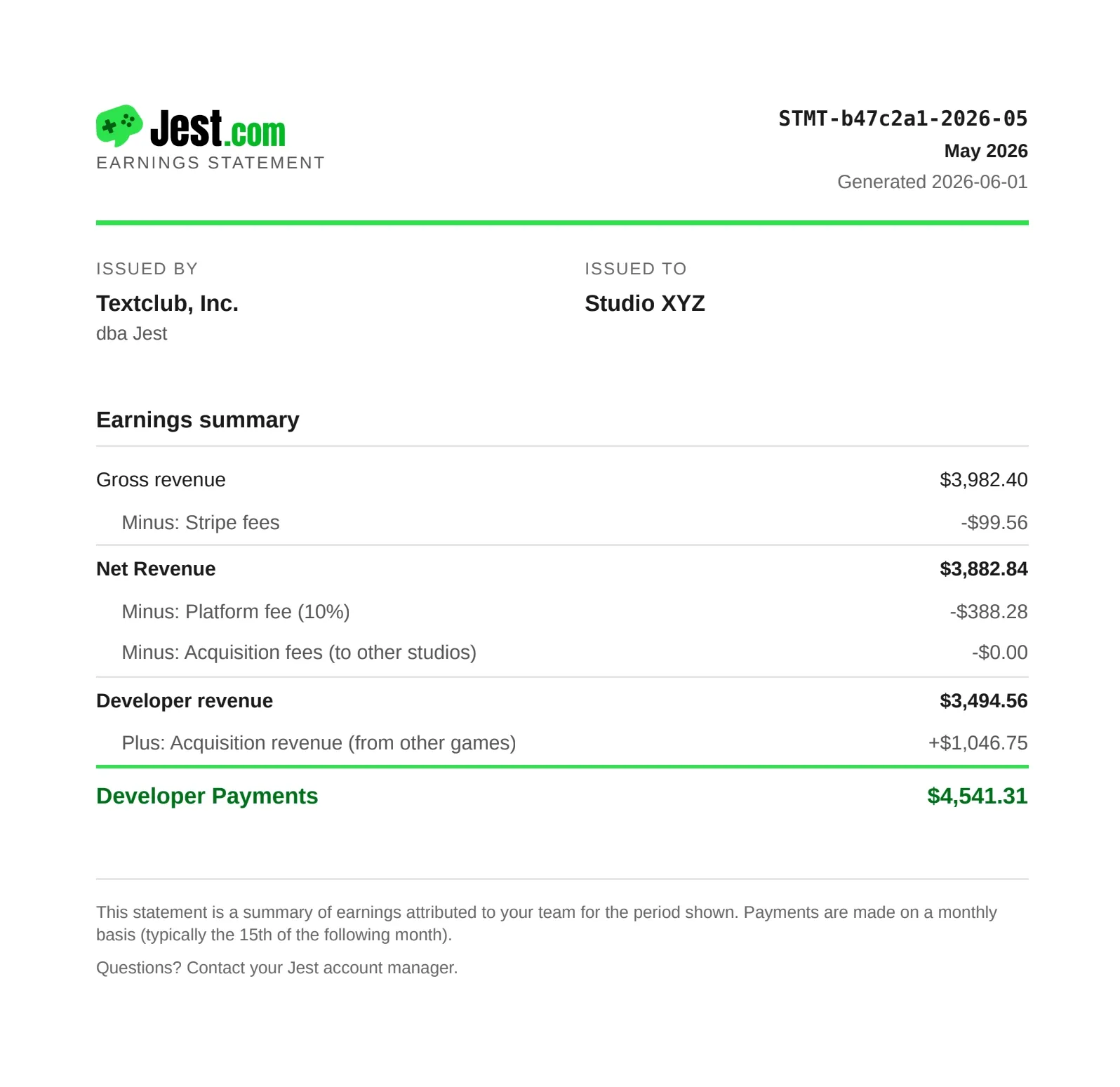
A sample earnings statement with Jest.
Use Jest avatars in your app
Give your users a familiar identity across apps with the new JestSDK.social module.
social.getProfile() gives you the user’s Jest username and avatar URL, making it easy to add identity to leaderboards, lobbies, guild rosters, and more - without building your own account system, avatar upload flow, or image hosting. Handle the empty cases when you wire it up: it returns null for a guest who hasn’t registered, and avatarUrl can be null even for a registered user.
You can also use social.getBotAvatar() to make your app feel populated before you have a large userbase. Give AI opponents a face, fill out a leaderboard, or create a matchmaking pool with believable rivals.
Bot avatars are deterministic, so the same rival keeps the same avatar across sessions. The opponent your user beat on Tuesday will still look like the same opponent when they see them again on Friday.

Trivia Battle’s leaderboard uses Jest avatars.
Better landscape support
Landscape apps now feel like landscape apps across Jest.
- True fullscreen on Android: Apps that declare
supportedOrientation: "landscape"automatically enter fullscreen and hide Android’s navigation UI. If the browser blocks fullscreen, users get a tap-to-enter option instead. - Fullscreen works wherever users launch your app: The same behavior now works when an app is opened from an app card, activity tile, profile, or other in-app surface.
- Platform UI adapts to landscape: Registration, checkout, post-purchase screens, and popups now use landscape-friendly layouts instead of squeezing portrait layouts into a horizontal screen.
- Better iOS text rendering: Overlay text no longer gets unexpectedly enlarged when iOS Safari rotates into landscape.
Piece of Cake, a new landscape game on Jest.com.
If your app is landscape, declare it: Set Supported Orientation to Landscape in the Developer Console. That’s what turns on the Android fullscreen behavior. The default is Both, which adapts to either orientation and shows no rotation prompt, so a landscape-only app has to say so explicitly.
Other updates worth knowing
- Personalize referral link previews (HTML5):
JestSDK.referrals.shareReferralLink()accepts ashareImageas a base64 data URL (canvas.toDataURL("image/png")works), which becomes the social preview image on the forwarded link. Generate it at share time to show the moment being shared: a score, a boss, a board state, or whatever else is specific to that run, instead of a generic card. → Personalized link previews - Prices are now in USD: Products, the checkout modal and the user’s balance are all denominated in US dollars rather than Jokens, with a 99c minimum, so your product config now reads the same as your revenue report.
- Referral notification templates in Unity:
NotificationTemplateslets you send different messages depending on how many people a referrer has brought in, gated withMinConversionCount. markGameLoaded(): One call dismisses the platform loading overlay and records readiness. Call it at the point a user could actually start playing, not when your bundle finishes downloading. → Loading screen- A copyable curl for build uploads: Your app’s Secrets section shows a ready-to-run curl for the upload endpoint with your upload token filled in, so you don’t have to reassemble headers and field names from the docs.
- Docs your coding agent can read: Every docs page is also served as raw markdown at the same URL plus
.md, alongside/llms.txtand/llms-full.txt, following the llmstxt.org convention. - Notification changes worth checking:
scheduleNotificationnow prefersassetReferenceover the deprecatedimageReference(it takes video as well as images) and adds a'critical'priority. The default priority changed from'medium'to'low', so setpriority: 'medium'explicitly if you were relying on the old default.ctaTextwent from 25 to 50 characters, andtitleandbodypicked up caps of 200 and 2000. → HTML5 notifications - Register self-hosted app URLs as versions: Register an externally hosted URL as a version instead of uploading a ZIP, if you already have a deploy pipeline you’re happy with.
- Hero video on store listings: Listings can run a looping video in place of a static hero image. → Dev console
- Logo and hero image come from the asset library: Update an asset once and it propagates everywhere it’s used. → Manage images
- App descriptions are capped at 110 characters: Now enforced in the console. It’s the line users read first, so it’s worth the time.
- Subscribe to the changelog: Sign up on the docs site to get what’s-new entries as they land.
Full details for every change are in the changelog. New to Jest? Start with the developer docs.